

If you’ve received a promo code to claim a promotion on Rumble Wallet and don’t know how to get started, head over here to learn how to set up a Rumble Wallet.
Once you are set up with a Rumble Wallet and have signed in:
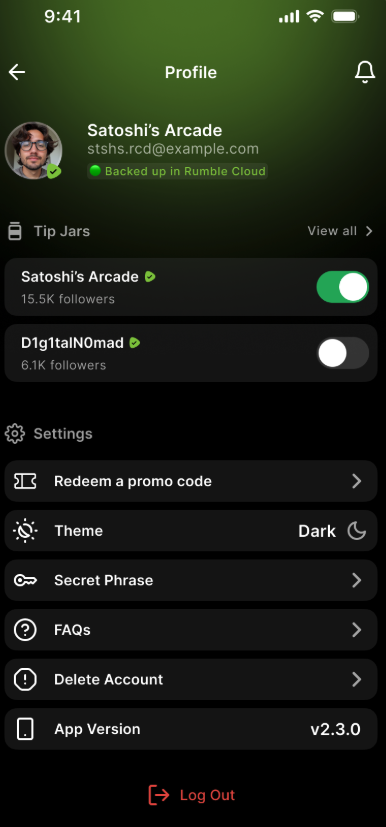
Go to the Settings page by clicking on your avatar in the top right corner
Under Settings, click on “Redeem a promo code”
If you have not entered your Full Legal Name before on Rumble, you will be asked to do so
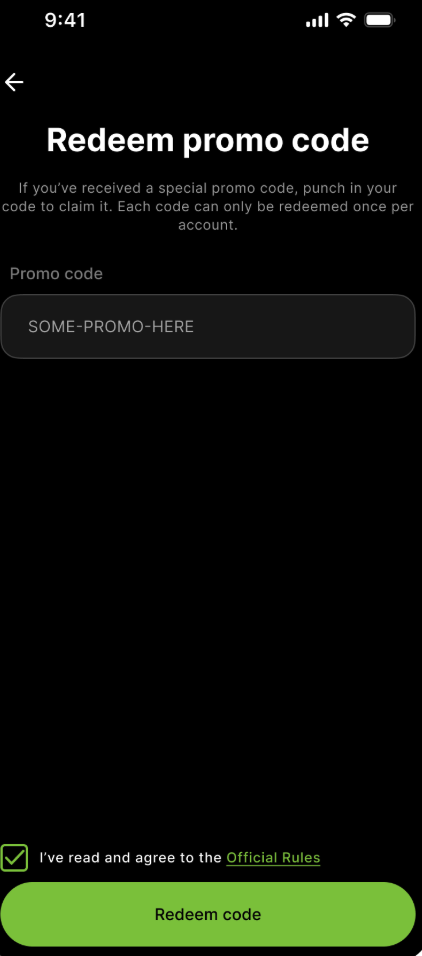
On the Redeem page, enter the promo code you received
Check the box for agree to the Official Rules
Click on Redeem Code
Wait for the promotional fund to be transferred to your wallet (time varies and can take up to 7 business days)
FAQ
Why is my promo code not working?
There are a variety of reasons why. The most common reasons may be that the promo has already expired or has been fully claimed by others already.
Can I claim multiple promotions?
You may claim promotions within the eligibility period noted in the Official Rules during the time the promotion is active
Can I share the promo code with a friend?
Promotions are on a first-come, first-served basis, so as long as someone has a Rumble wallet, meets eligibility requirements, and the promo is still valid, they can claim the code.
I received an error “Something went wrong, please try again later” when redeeming my promo. How do I fix this?
There may be an issue at the moment in processing the code, try again in a few minutes. If the issue persists after a few hours, contact support for further assistance.
I still haven’t received my funds from the promo, what should I do?
can take up to 7 business days to arrive in you wallet.
I don’t see an option to redeem a promo code, how do I redeem a code?
Make sure that you have at least version 2.3.0 of the wallet app. If you have an earlier version, upgrade your app.
How can I use my promo reward?
Your promo reward goes into a Tipping Wallet and can be used to tip creators on Rumble. To tip a creator you can send a tip directly through the Rumble Wallet app or click the Tip button on Rumble.com on web or the Rumble app.