

How it works
Make sure you're signed into Rumble. If you haven't already, create your free account here: Register for Rumble.
Join a Rumble live chat.
Support creators and viewers by selecting the Gift icon, next to the Rant icon.
Select the number of subscriptions to purchase and gift.
Confirm the purchase, agree to terms and conditions, and provide a credit card to complete the purchase.
Your gifted subs are randomly distributed and announced in the chat!
Gift recipients receive a chat alert and an email with details about the subscription.
What to know
There are two types of gifts, gifted channel subs and Premium gifts
Gifted subscriptions are available in live chats on the web and mobile apps (iOS v2.8.58+ and Android v3.1.44+)
App purchase prices vary from web pricing and include additional in-app purchase fees
Gifted subscriptions do not renew automatically
You must be logged in to use gifted subscriptions
Premium Creator Gifts
Gifts are available for Premium Creators who display the Premium button on their channels.
What to know
Premium Creator gifts are priced differently from gifted subscriptions and include more rewards
Premium gifts include one month free of Rumble Premium!
Included Rumble Premium gifts are good for one month from the date of purchase
App purchase prices vary from web pricing and include additional in-app purchase fees
Gifts do not renew automatically
Frequently Asked Questions
How much does the creator receive from the gifted subscription?
For web-based gift subscriptions, creators receive the amount minus a 3% transaction fee. For mobile app-based gift subscriptions, creators receive the amount minus a 30% app store fee.
How does gift distribution work in the chat?
Gifts are randomly dispersed to logged in accounts who have already participated in the chat at least once.
Gifts are randomly distributed and do not need to be accepted by the recipients
Channel followers get preference
Gifts will be given to users entering the chat
Gifts that are not dispersed by the end of the chat are discarded; the channel creator still receives the subscription proceeds
Gifts are valid one month from the date of purchase
Viewers who are muted or already subscribers are not eligible to receive a gifted subscription
If the chat continues and there are still gifts available, they will be dispersed to any eligible viewers that enter the live chat
No refunds issued for gifted subscriptions that are not distributed
For Premium Creator chats with gifts, distribution works a little differently than regular chats.
The same rules for normal gifted subscriptions apply (see above)
Viewers who are muted or already Premium channel gift recipients are not eligible to receive a gift
The included free month of Rumble Premium must be claimed or accepted.
Must be claimed via promo code within 30 days
Ways to claim:
A chat alert while the live stream is still active
Email notification with link to claim
Your Manage Subscriptions page while the offer is active
Recipients must provide credit card information to claim the trial subscription
Recipients can cancel any time
The subscription auto-renews if not canceled
The free month can be applied to monthly or yearly plans
Can creators purchase gift subscriptions in their own chats?
Yes!
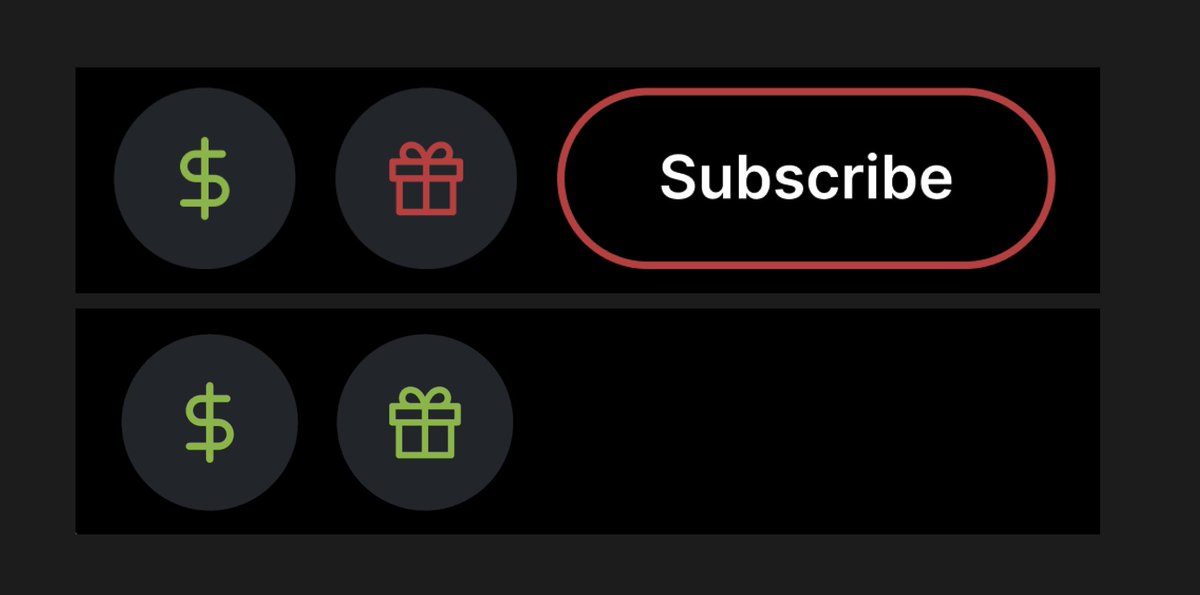
What do the gift icon colors mean?
If the gift icon is red, you are gifting a channel subscription which allows for:
Sub badge
Chat highlight
Access to exclusive channel emotes
A one-month free trial to Rumble Premium as a bonus
If the gift icon is green, you are on a creator who has exclusive Premium content (but who doesn't have channel subs), in which case Premium gifts cost more.
Can viewers not logged into Rumble purchase and receive gift subscriptions?
You must be logged into Rumble to purchase and receive gift subscriptions.
Where can I manage gifted subscriptions?
You can track your gifted subs activity by visiting your Account Overview page, where you'll see the total gifted subs purchased and your monthly earnings.
Manage gifted subscriptions by visiting the Manage Subscriptions page from your Rumble dashboard. Select Account > Following & Subscriptions > Manage Subscriptions to view and take action on all of your Rumble subscriptions and gifts.